
SSDs with usable built-in hardware-based full disk encryption

(tl;dr / post summary: Many current SSDs do super fast hardware AES encryption, but only a very few expose this correctly to the user, meaning you often still need a third-party software solution. Information on this is incredibly hard to find.)

Imagine that your laptop or your PC gets stolen. That would be terrible. However, it would be even worse if your laptop contained confidential data, either your own or that of your employer or client.

It’s clear that encrypting one’s hard drive has become a necessity. There are good open source software solutions for this, for example TrueCrypt (Windows, Linux and OSX) and the LUKS/dm-crypt system. However, such software encryption systems require a small chunk of your CPU capacity, and also affect SSD performance and durability to a lesser or greater extent, depending on the controller.
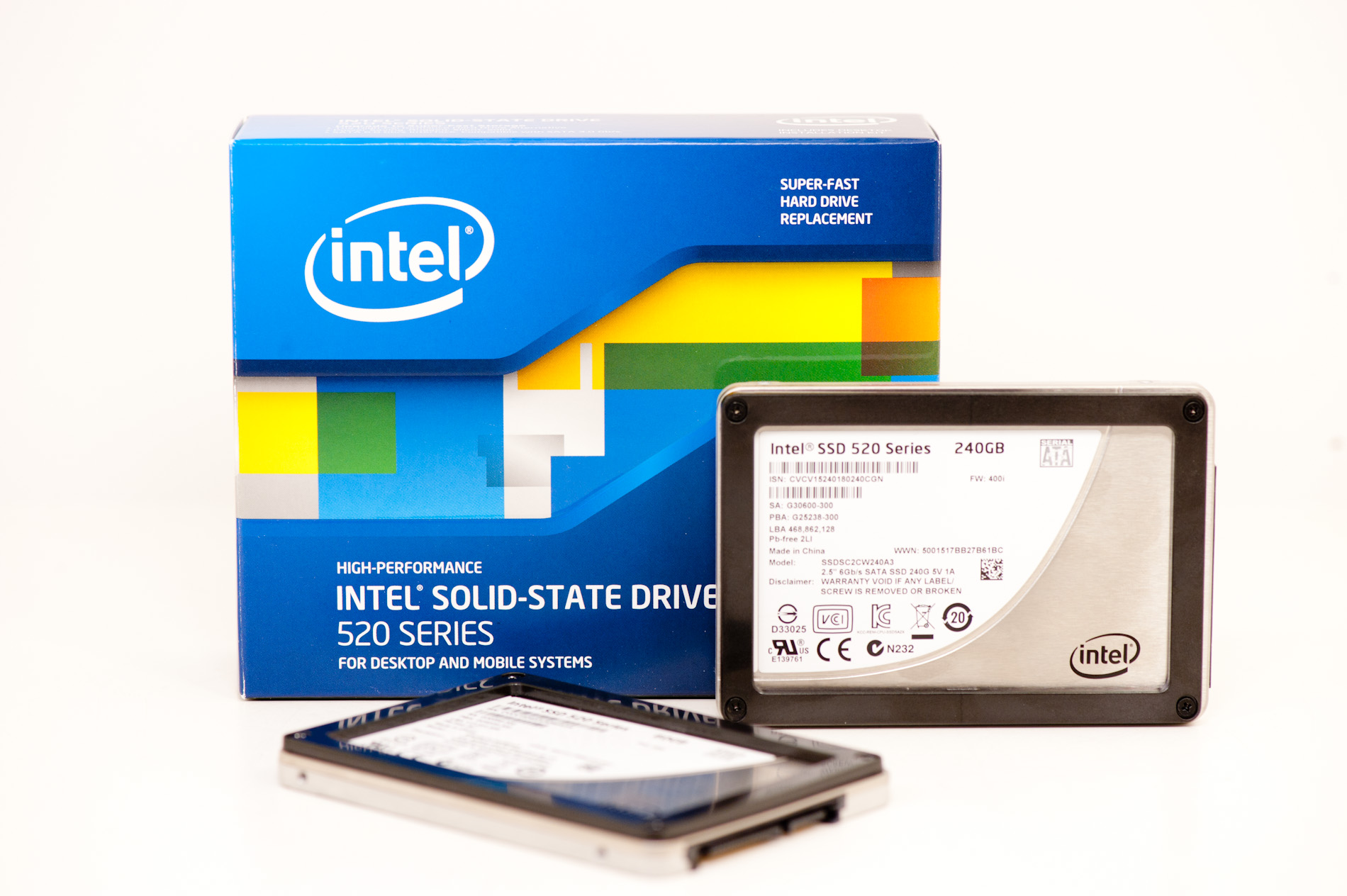
Intel 520 self-encrypting SSD. Image courtesy of Anand Tech.

Intel 520 self-encrypting SSD. Image courtesy of Anand Tech.

A number of SSD drives now implement real-time AES encryption in hardware. Usually the reason for this is to enable fast secure erase: When the AES keys are destroyed by the firmware, a very cheap operation that requires almost no writing to the flash, no data on the whole SSD can be read, and can thus the data can be considered securely erased. The encryption and decryption take place in the controller hardware, so there is no performance hit. The Sandforce SF2281 controller is one of the more well-known SSD controllers that does this.

In some cases, the manufacterer uses the HDD password or ATA password (configurable via many laptop BIOSes, very few desktop BIOSes, or the ATASX BIOS extension) to encrypt the AES keys. This means that even if the manufacturer got hold of your drive, and you had set a strong ATA password, they would probably never be able to decrypt your data. I call this usable built-in-hardware-based full disk encryption. In these cases, you do NOT need to install third-party software full disk encryption, and can enjoy the full performance of your SSD.

In many other cases, the encryption keys are stored in the drive firmware, but are NOT explicitly encrypted with a user-supplied password. This is non-usable encryption, because in theory the manufacturer or a sufficiently skilled hardware hacker can extract the encryption keys from the drive firmware and decrypt all of your data. In these cases, you ABSOLUTELY have to use a third-party software disk encryption software tool.

The purpose of this post is to keep a list of current SSDs with usable and non-usable built-in hardware-based full disk encryption. Whilst recently shopping for a suitable SSD, this information was unreasonably hard to come by, hence this list. If you have additions or corrections, please let me know in the comments.

SSDs with USABLE built-in encryption:

Intel 320

This post and this post by an Intel representative confirm that the AES keys on the Intel 320 SSD are encrypted with the user’s ATA password. The second gives more detail on the implementation details, for example that the ATA password itself is also stored in non-reversible hashed form in the drive firmware. The white paper linked to under the Intel 520 heading below confirms the working of the 320 encryption setup.

Intel 520

This is the first Intel SSD making use of the Sandforce SF-2281 controller. Due to a bug in the controller, the drive does AES-128 encryption (instead of the advertised AES-256). AES-128 is still considered to be sufficient for most purposes.

After two unsuccessful attempts getting a clear answer on the details of the Intel 520 encryption directly from Intel support, I finally stumbled on this white paper by Intel: Managing Intel Solid-State Drives Using Intel vPro Technology (mirror here). On page 3, in the grey box at the bottom of the page, we see the following text (bold words by me):

How Self-encrypting drives (SEDs) Work: SEDs, such as the Intel® SSD 320 Series and Intel® SSD 520 Series, have a drive controller that automatically encrypts all data to the drive and decrypts all the data from the drive. The disk encryption key is never present in the computer’s processor or memory, where it could be accessed by hackers. The key used to encrypt and decrypt is securely stored only on the drive. Because the disk encryption key is encrypted with the ATA (Advanced Technology Attachment) passwords, the key is made accessible to the drive only after successful user authentication; without the key the data remains encrypted on the media. Authentication of the user is done within the SED by supplying the ATA user password, which is isolated from the OS. Therefore, attacks on OS vulnerabilities cannot affect an SED’s pre-boot process.

That’s a pretty conclusive statement by Intel that both the 320 and the 520 encrypt their AES encryption key with the user-supplied ATA password.

After a few weeks and some mails with Intel tech support, I also received the following confirmation concerning the Intel 520 SSD:

Yes, ATA password is used to encrypt the encryption keys stores on the SSD. In other words: The Encryption Keys depends on the ATA password to decrypt them. The ATA password is not used in combination with the Encryption Keys to encrypt the data.

Intel support furthermore confirmed that the Intel 520 is compliant with FIPS-197.

SSDs with PERHAPS USABLE built-in encryption

In these cases there are indications that the mentioned drives are encrypting the encryption keys with the ATA user password, but I have not been able to find more conclusive confirmation. If you find anything, please let me know it the comments, because eventually I’d like to move them out to the list of USABLE or NON-USABLE encryption.

Plextor M5 Pro

On the product page the graphic shows quite clearly that ata passwords are related to encryption keys, but it does not specify in which way these are linked. A reasonable approach would of course be that the key is encrypted with the ATA password, but until that’s confirmed, this drive remains on the “perhaps”-list.

Samsung 840 Pro

Again it’s far too hard to find conclusive information on the encryption implementation. On this product page, we find the following text:

Keep your data safe with Self-Encrypting Drive (SED) Technology

Simply enable an HDD password via your computer’s BIOS, and Samsung’s SSD 840 applies data encryption automatically.

This is not as conclusive as I’d like, but there is an implication that there’s a link between the HDD password and the encryption on the Samsung.

Samsung PM830

This drive is not to be confused with the consumer-oriented Samsung 830. The PM830 is a special professional OEM version, found for example in Dell Latitude laptops. There are indications, such as this great 2012 overview paper, titled Hardware-based Full Disk Encryption (In)Security Survey, by Tilo Muller, Tobias Latzo, and Felix C. Freiling (accompanying website with demonstration videos), which mention the PM830 as an example of hardware-based full disk encryption. I’m still searching for the cited spec document that might confirm whether the PM830 encrypts its AES-256 keys with the ATA password, and also the possible password-length limitations.

SSDs with NON-USABLE built-in encryption

OCZ Agility / Vertex 2 / 3 / 4

In this posting on the OCZ Technology Forum, we see that in at least some of the OCZ SSDs, “The encryption key is not directly linked to the ATA Security password (or the BIOS password).” I have not been able to find more specific information about other OCZ offerings. However, my expectations are not very high based on this previous work by OCZ.

Conclusion

  1. Manufacturers of SSDs with built-in encryption are doing an absolutely TERRIBLE job of informing their customers of their specific encryption implementations. For something as critical as full disk encryption, I would expect full disclosure. If the encryption approach is good, disclosing its details won’t affect its security.
  2. The only SSDs that I’d recommend in terms of usable built-in disk encryption are the Intel 320 and 520 drives. It would be great if this list could be expanded. If you have a direct connection to the relevant persons at the various manufacturers, please make use of this and let me know of the results so I can update this blog post.
  3. Your BIOS has to support the full 32 character ATA password specification. The Samsung laptop I’m typing this on only supports 8  character ATA passwords, so I’d think carefully about installing a hardware-based encrypted SSD in here. My desktop with the Intel 520 SSD has the ATASX bios extension and supports up to the full 32 characters. When you buy a new laptop or motherboard, make sure it has a good ATA security extensions implementation, supporting the full 32 characters.
  4. Although ideally the built-in hardware encryption would be usable and secure, the disappointing state of affairs leads me to the conclusion that a good option at this point is still to select an SSD that is impacted as little as possible by the software encryption (avoid the Sandforce controllers, or any other controllers that make use of hardware compression), and then use a solution such as TrueCrypt or luks/dm-crypt (even for a non-Sandforce controller such as on the OCZ Vertex 4, the negative impact is significant, unfortunately). For my next SSD purchase, I will again compare the super-fast hardware encryption of the Intel 520 vs. SSDs that are able to cope to some extent with software encryption, although I am currently leaning towards the Intel 520.

Other resources

Updates

  • 2013-02-08: Updated with confirmation by Intel tech support concerning the Intel 520.
  • 2013-01-15: Updated link to Muller et al. overview paper.
  • 2012-12-23: Added the Samsung PM830 to the “perhaps” list (thank you Pieter Kitslaar), and linked to great hardware-based full disk encryption overview paper.

29 comments

  1. Pieter Kitslaar

    I recently got a new Dell Latitude 6530 laptop which has a Samsung PM830 SSD. This also supports AES 256-bit encryption.
    According to http://joeraff.org/20120704/software-encrypted-ssd-performance-a-surprising-outcome/ it does use the HDD password but only supports 8 character MAX which is not that great. But I think you could add it next to the 840 in the list.

    • Pieter, thanks for popping by!

      As I understood, the consumer 830 does not expose encryption to the user. Some OEM versions, like the one in your Dell, reportedly do. That blog (I fixed your link) is a bit thin on sources.

      I did some more searching and found this: http://www.dell.com/support/drivers/us/en/19/DriverDetails?driverId=F76F0

      Is the 830 in your Dell also a “Samsung PM830 256GB FDE 7MM”? The FDE in there = full disk encryption. It also seems the PM830 (vs just the “830) is the professional version only found in OEM products. I think I can add this specific model to the “PERHAPS” list. Please do keep me up to date if you run into more details as to the link between ATA password and the AES keys, as well as the 8-character limit.

      • I am currently evaluating this as well, and it seems that at least mainboards from intel and asrock have the same 8 character limit.
        I am left wondering if this enables brute force attacks, as this really depends on drive behavior. Old drives used to be restarted every 5 tries, which made brute forcing even for the shorter password pretty much prohibitively expensive. But many drives also had backdoors and master passwords, and I am not really comfortable with this idea.

        The 8 character limit might stem from the fact that the maximum length for an ATA password is 32 bytes, which might fit depending on the encoding and localization. On the other hand, 8 characters is just the old unix limit which has been dragging security down in many places just because it always was so, and we all know that BIOS development isn’t really on the forefront of anything.

  2. Any chance you can confirm or not on the 520′s:

    1: A TPM chip is NOT required period for this to work. The TCG OPAL standard states it not in the FAQ (http://www.trustedcomputinggroup.org/files/static_page_files/B1105605-1D09-3519-AD6FD7F6056B2309/Opal_SSC_FAQ_final_Jan_27_4_.pdf) but would love it confirmed before I spend money AS Intel never stated, far as I can tell, these are officially Opal compliant.

    2: Happen to know if Intel plans to fix the controller? I.e. is it a hardware failure or something they can fix in the future via a firmware update.

    • 1. It does NOT require a TPM chip. I am running the Intel 520 with encryption on a board without any TPM.

      2. What do you mean by “fix the controller”? If you’re referring to the AES-128 instead of AES-256 support, probably not.

  3. One BIG question concerning any/all of these drives having usable crypto built-in: At what point are the keys used to encrypt/decrypt the actual drive generated? I understand the details of encrypting those keys by way of an HDD password, but I wonder, what is generating the actual keys in the first place? Can the consumer do anything to change those keys? What algorithm is used to generate the keys? How is it seeded? Exactly what algorithm is used to hash the keys?

    According to a post at AandDTech, someone spoke with Samsung who stated that the 840 Pro requires a bios capable of setting an HDD password AND contains a TPM chip. If that’s true, then people having systems without a TPM will be lulled into believing that they have locked-down their drive by setting an HDD password. You also pointed out the need for a bios that supports 32 character passwords — yet another major detail that the drive manufacturers don’t specify.

    I assume that the process of manufacturing the drive includes generating keys that it will use. Is there a way to change those keys before you use the drive for the first time? If not, then isn’t it possible that a record of each drive’s serial number and its key exists somewhere?

    Any reasonable documentation that outlines how *anything* implements crypto technology begins with an explanation of how the underlying key(s) in play are generated. PGP, TruCrypt, and MSFT Bitlocker all document very thoroughly details concerning what/how/when keys are generated, the exact algorithms used to encrypt those keys, where the keys are stored, and the protocols for decrypting those keys.

    The complete lack of documentation regarding the self-encryping drive’s crypto technology makes the security of those drives highly questionable.

    Finally, I think its noteworthy that modern processors all have hardware encryption/decryption built-into the chips themselves, so there won’t be any major performance benefit of using a self-encrypting drive in a system using something like an Intel i7 chip. In the little bit of testing I have done on a box containing an i7 chip, I have seen very little perf. degradation by turning-on Bitlocker with 128 bit AES encryption.

    I like the idea that a self-encrypting drive is going to be immune to O/S pre-boot holes. Self-encrypting drives also don’t come with the headaches associated with backing up and restoring systems using software encryption. These are major benefits. Its really too bad that the technology in self-encrypting drives is so dubious.

    • 1. When you do a secure erase (recommended when starting with a new SSD), the firmware generates a new random encryption key. This is one of the reasons for implementing hardware-based AES encryption: fast secure erase!

      2. The performance impact of third-party software encryption on SSD drives is significant. This is not due to the CPU needing more time (you’re right that AES-NI helps here), but due to the way modern SSDs store your data. Encrypting the data in software beforehand negates a whole bunch of optimizations in the SSD, leading to severe performance degradation.

      • Thank you for the response. I’m wondering if you would elaborate on your statement that 3rd party FDD software causes a significant perf. hit due to the way modern SSD’s store data.

        It seems to me that one stream of bits is just as good (or bad) as any other. Whether the bits were previously encrypted by software or not is entirely transparent to the SSD controller, so should not affect in any way how an SSD stores those bits. All the SSD controller knows is that the O.S. has given it a stream of bits with an instruction to serialize them to its storage medium. It shouldn’t know or care where those bits were before they arrived at the SSD. No matter what went-on during their prior journey, all bits are entitled to the same love and equal treatment under the laws set forth in the firmware code. The processes, procedures, and optimizations it undertakes should be the same on the bits, whether encrypted or not.

        Am I wrong?

        • You are wrong. :)

          Many modern SSDs use on-the-fly compression to improve performance. Not only the well-known Sandforce controllers do this, also many of the custom firmware designs. Encrypting the data beforehand makes it significantly less compressible.

          Read this answer on superuser.com for more this and more problems with compressing SSDs + third party encryption: http://superuser.com/a/358137/130835

          Even with the Crucial m4, which does not compress data on the fly, third party encryption still has a significant effect: http://www.ausgamers.com/forums/general/thread.php/3236998#post3237039 (the poster claims it’s not a problem, but looking at the measurements, that’s a huge hit)

          The bottom-line is that SSDs use all kinds of tricks (modern ones have multiple processors on the drive!) to increase performance and increase the lifetime of the drive. Your logic that all types of data should be the same in the eyes of the drive does not hold anymore. :)

  4. Handy article, thank you. Here’s another candidate:

    Kingston V200+ probably counts as ‘perhaps usable’. I’ve got one for my laptop so I have reasonable confidence that client data is safe in case of theft, loss etc; encryption enabled through ATA password mechanism. It’s apparently Sandforce based, and probably does AES-128 encryption. I don’t know the detail of the implementation though. One reference to the encryption here,
    http://news.softpedia.com/news/Kingston-SSDNow-V-200-and-KC100-Affected-by-Encryption-Flaw-275237.shtml

    and Kingston’s own page on the drive,
    http://www.kingston.com/en/ssd/vplus#svp200s3

    • Can you find any more information, for example in the manual that you got with the drive, or from tech support? The two links are very thin on information… All Sandforce conroller drives encrypt, the question is how exacly they use your ATA password. Ideally, it should be used to encrypt the randomly generated keys.

      I simply logged a support ticket with Intel, and after some weeks finally got a clear answer confirming this for the Intel 520. Would you be interested to try something similar for the Kingston?

      They need to answer YES or NO to the following questions:
      1. Does the V200+ encrypt its AES keys with the ATA password?
      2. Is the ATA password stored as a non-reversible hash on the firmware?

      Would be great to add the drive to the top list, and not the “maybe” list. :)

  5. Thanks again for the reply. I understand the issues surrounding encryption and compression, and see what you mean there. Encrypted files are frequently larger than their decrypted counterparts. There are also tricks for encrypting text that can’t be used on encrypted text. So, I can see how 3rd party FDD encryption could have the effect of reducing a drive’s overall capacity, and arguably their lifetimes.

    I’m not sold on the idea that 3rd party crypto software *necessarily* causes performance degradation, at least not when running on a processor having dedicated crypto logic. Obviously, it also depends upon the drive too, so the trick here is to use drives that are not implementing a lot of compression. Don’t get me wrong: I would prefer to use a self-encrypting drive for the reasons I originally stated — I am puzzled by the fact that the manufacturers publish NOTHING about their encryption technology; not even a user’s guide.

    I’m using a Samsung 830 with Bitlocker 128 bit AES. The various benchmarking tools I have used on it reveal that the drive performs almost exactly according to Samsung’s published specifications. That does not prove that Bitlocker is not a drag, but it implies that it is not a significant factor in limiting the drive’s performance.

    When I get around to it, I will decrypt the drive and publish before and after results. From what I see now, I will be very surprised if there is much perf. improvement once the drive is decrypted.

  6. AnthonyNYC

    Hi Guys,
    I think the reason True Crypt (and BitLock also might fit in the same category)doesn’t recommend using software based encryption on SSD’s isn’t so much because of compression issues or even a speed hit, it’s more a problem for the wear leveling firmware used onboard SSD drives.
    The way i see it, when you write some data to an SSD the firmware spreads it around evenly on different NAND chips and tries to use them all evenly so as the name implies, the NANDS wear out evenly, thus getting the longest life possible out of the NAND chips limited write span.
    BUT software like TrueCrypt write random data to the entire drive so that someone can’t differential between encrypted data and empty drive space, see?
    As far as someone reading the drive, the entire drive is full of the same encrypted data. SSD’s would wear out very quickly with such a data handling scheme bypassing their internal data wear leveling tricks. If all the data on every bit of NAND looks exactly the same (random bits)then the internal firmware can’t do its job of balancing the data over less used empty spaces. So basically encrypting the entire SSD is like wearing out every single bit of NAND memory all at once. Totally defeating any chance of wear leveling firmware to properly extend the life of the NAND chips, and i would think extremly shortening the life of the SSD.
    That’s why I think the internal encryption handled by the ssd’s own firmware is ideal and secure the problem is there are hardly any motherboards with HDD password Lock capability.

    I wish even an add in SATA controller card would be sold with HDD Password feature enabled in the cards own BIOS which would allow SSD’s to be password locked before the motherboards BIOS even gets to detect the drives.
    That’s what I am hoping to find in the future.
    Thanks for this page, it’s helpful!
    Regards all,
    AnthonyNYC

    • Thanks for stopping by!

      The effect of third party encryption on the SSD wear-leveling is certainly also an issue. I think we all agree that hardware-based FDE is to be preferred, but that we need more transparency from the SSD manufacturers, and that we need better support from the motherboard makers.

      As you will have seen elsewhere on this blog, the ATASX BIOS extension to a certain extent alleviates the motherboard-support problem, but it’s still not ideal.

  7. I took your advice to a previous comment that the two main questions which SSD drive company support teams need to answer are:
    1. Does the encrypt its AES keys with the ATA password?
    2. Is the ATA password stored as a non-reversible hash on the firmware?

    I asked this question to OCZ support in regards to their OCZ Vector 256GB device as this drive received the highest performance marks on Tom’s Hardware.

    Below is a copy/paste of their reply. Do you think this is sufficient to conclude the hardware level encryption was properly implemented on the OCZ Vector drive? If not, are there other questions I should direct to OCZ support?
    Thanks for the great and detailed blog posting!!

    Comment by Eric Von Stwolinski from OCZ Support.
    “The drive does support 256-bit AES. It is enabled by setting an ATA level password.

    Once a password is set the drive is completely inaccessible until the password is provided. There is no master password for the drive or any way to access the drive other than to supply the correct password once it is enabled.”

    • I’m very happy that you took time to contact OCZ tech support!

      Unfortunately they somehow always manage to evade the very direct questions that we ask, which makes one wonder. He unfortunately has not answered the very simple question (I’ve improved the phrasing somewhat): “Is the AES key, that is used to encrypt the data on the drive, encrypted using the ATA password?”

      With previous OCZ drives, OCZ explicitly said that this was NOT the case. Having drive firmware that refuses to decrypt without the ATA password having been supplied is one thing. Encrypting the AES key WITH the ATA password is another, and is preferable. In the former case, it is STILL possible for the manufacturer to retrieve the AES key from the firmware, in the latter they need your ATA password.

      Do you think you could reply to his answer using my rephrased question above? I would love to add another drive to the list!

      Thanks again,
      Charl

      • I copy/pasted your question and received the following reply, “It uses AES encryption, but this feature is enabled and used by setting the ATA password on the drive.
        If no ATA password is on the drive then the AES encryption is inactive. Only when an ATA password is applied to the drive is the AES encryption used.”.

        I’ve now replied back saying the following. “Unfortunately, your last response doesn’t directly answer my question. I’ll repeat and rephrase my question. Thanks for your assistance in clarifying this important point for me.
        Repeat: ‘Is the AES key, that is used to encrypt the data on the drive, encrypted using the ATA password?’
        Rephrase: I understand that the AES encryption is only activated once the ATA password has been applied. My question is about how the ATA password is applied in relation to specifically the AES encryption key. AES encryption requires a key to encrypt and decrypt the data. The handling of this AES key is the focus of my question. Is the AES key itself encrypted using the ATA password?”

        What do you think? Is there a better way to rephrase the question? I hope I understand what you’re trying to have me clarify and that my rephrase gets to the core of the issue.
        My concern with this 2nd reply is that I thought AES encryption was always active as this is how the SSD drive easily formats/erases the data, by deleting the AES key used to encrypt the data. Apparently either I’ve misunderstood something or the response isn’t very clear/incorrect.

        Thanks again for your feedback and assistance!

        • OCZ replied, “The ATA password is the AES key.

          The key for AES is enabled, disabled, or set using the ATA level password function. If an ATA password is set then AES is enabled, and the key to unlock the drive is the ATA password.

          This means the ATA password must be provided every time you want to access the drive or if you want to change/disable the password.

          Any attempt to access the drive without providing the ATA password would require getting through AES 256 bit, which isn’t possible to do with currently existing computers.”

          The ATA password is the AES key? Is this sufficient to add the drive to your list as properly implementing full disk encryption?

          • You’ve done a sterling job of formulating very clearly the question.

            If we can believe the OCZ representative, it is starting to sound like they did it correctly.

            If we can take his answer literally, they’re using your ATA password (maximum length 32 characters according to the BIOS spec) directly as the AES-256 keys (256 bit = 32 bytes). I’m going to add the drive to the list, with a pointer to your comments here. Thank you very much for taking the time to get to the bottom of this.

            If OCZ has any official documentation further corroborating this fact, please feel free to let me know here in the comments!

            (I do share your doubts with regard to the fast erase by changing the AES keys. I’ll add this to the blog body.)

          • I really don’t believe that that representative knows what he is talking about. Otherwise, it wouldn’t be possible to change the HDD password without either rewriting all of the data or permanently losing it.

  8. I came accross your website while looking for information on the M5 from Plextor, and then came accross one of their blog.

    Basically it seems that they use ATA password:
    The AES key is generated by the SSD controller. To fully secure your data, you will want to set the ATA password on the computer you are using the drive with. Access to the AES key is then not possible without the ATA password. If you don’t set the ATA password, the AES key is accessible; meaning the data on the SSD can be decrypted.

    • I read through that comment. The Plextor representative still does not state whether the AES key is encrypted with the ATA password, and that’s a crucial point. I have just left behind a comment on that blog asking for clarification. Let’s see!

  9. Just bought&installed Intel 520 SSD. I made the decision after reading your blog. Full-disk encryption was a critical factor for me. Thank you for taking the time to look up the specs, too bad the manufacturers do not make this information readily available!

  10. Seems the prior comments and replies hit the limit of depth and no further replies are allowed.

    I asked both questions proposed cpbotha and data. My questions and the OCZ tech replies below. Let me know if there is anything else I should ask or if we know enough to be certain?

    Tech, Eric Von Stwolinski: “The notes about AES support are just on the product page for the Vector drive:
    http://ocz.com/consumer/vector-7mm-sata-3-ssd

    My reply: “Hi Eric,

    I have two follow-up questions. I do appreciate your assistance is sorting the AES encryption on the OCZ Vector SSD!
    1) The product detail page you linked is very vague only saying, “256-bit AES-compliant, ATA Security Mode Features”.
    Is there a more detailed public resource that provides the same level of detail you’ve provided regarding the AES encryption key and relation with the ATA password?
    2) Regarding your previous comment two responses ago, “The ATA password is the AES key.” If this is true, then changing the ATA password will change the AES key, since they are the same. The current data on the OCZ Vector SSD, which was encrypted with the prior key, can’t be decrypted with the new/changed key, rending the current data unreadable? To summarize, you’re saying if the ATA password is changed, the current data on the OCZ Vector SSD is lost?”

    Tech, Eric Von Stwolinski: “We have no further documentation about the drive’s security features. This is only a consumer grade drive. Our enterprise grade drives have much more documentation available. If you are looking for a high security drive I strongly recommend looking into an enterprise grade drive.
    If you wish to destroy all information on the drive forever, that can be done using the secure erase function in the toolbox utility. This is the only way to reset and wipe the drive. A secure erased drive is not recoverable by any means.”

    My reply: “Hi Eric,
    Thanks for clarifying the documentation. I’m still not clear on my previous follow-up question. I’ll rephrase and attempt to clarify.
    Is it true that changing the ATA password will render the data on the drive unreadable or inaccessible?
    This is based on your comment that the “ATA password is the AES key”. If this is true, changing the ATA password would change the AES key. Without the previous AES key (previous ATA password) that the data was encrypted with, the drive can’t decrypted the stored data.
    Can you confirm that changing the ATA password makes all data, prior to the ATA password change, on the drive unreadable or inaccessible?”

    Tech, Eric Von Stwolinski: “Changing or removing a password will not wipe out all information on the drive. That can only be done by a secure erase using the toolbox.
    Forgetting a password will render the drive inaccessible and all data is lost, but merely changing or removing the password (which requires that the correct password is first supplied) will not destroy any information on the drive.”

  11. Hi, A very interesting read!
    If anyone has time please could they answer the following:
    I’d like to install a new Samsung 840 Pro SSD in my laptop and wondered what order I should do things in. Is the following correct?

    1. Set a HDD password
    2. Securely erase the SSD drive
    3. Install the OS

    My laptop supports TPM and I’m wondering what advantages, if any this will offer to me?

    Thanks
    Simon

  12. This page provides some valuable information on SED implementations on current SSD drives. However another big problem seems to me to be the support for ATA passwords within the motherboards from major brands. A lot do not support this Feature!

    Many people who buy the drives you describe can therefore never use the encryption function because their motherboard does not support the method to set the drive encryption.

    Almost all ASUS, MSI, Gigabyte etc motherboards do not support this feature.

Leave a Reply

Your email address will not be published. Required fields are marked *

You may use these HTML tags and attributes: <a href="" title=""> <abbr title=""> <acronym title=""> <b> <blockquote cite=""> <cite> <code> <del datetime=""> <em> <i> <q cite=""> <strike> <strong>